

"Plane game" is a colloquial name for the crash game Aviator by Spribe: at 1win, as at any casino with this provider, you need to open the Spribe games section, launch Aviator, place a bet before the plane takes off, and cash out the multiplier — manually or automatically — before the round ends in a crash.
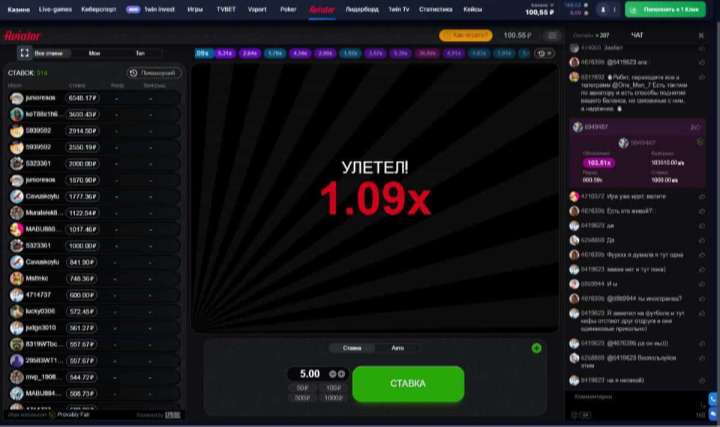
"Plane game" is not a separate game, but a colloquial name that many players use for Aviator because of its central visual: a small plane takes off and the bet multiplier grows from 1.00×. If you see "plane game", "airplane game", or simply "the plane" in search queries or chats, it almost always refers to Spribe's Aviator, released in 2019, and not to another game with a similar name.
At 1win, as with most operators integrating Spribe, the game is listed in the lobby under its official name — Aviator, with the Spribe provider logo nearby. The casual "plane game" is convenient for search and for explaining the mechanics to a new player, but in the casino interface you should look for the word "Aviator" or the Spribe provider section.
Casino interfaces are updated regularly, so we describe the general path through a typical lobby with providers, not the exact names of sections in a specific version of the 1win site or app — check the current location directly in the interface at the time of your visit.

Aviator is located in the crash games section of the 1win lobby. A full breakdown of the operator using the same methodology is on the page Aviator at 1win.
Before making your first real-money bet at 1win or any other casino, it makes sense to understand the pace of a round and how auto cashout works without risk. The availability of a demo mode for Aviator at 1win depends on the current version of the site and your region — check in the interface whether there is a "demo" switch next to the game.
What we can offer with confidence is the demo simulator on this site: it reproduces the published mechanics and the multiplier calculation formula using demo credits, with no money and no connection to any operator, including 1win. This is a good way to get comfortable with the betting and auto cashout interfaces before moving on to real-money play at your chosen operator.
The AviatorGames demo simulator shows the mechanics, but the seeds are generated by the browser, not by an independent third party — this is not "provably fair" in the operator sense. You can verify a specific real round with an operator only through the built-in verification panel of the game itself — see fairness verification analysis.
Aviator is designed primarily for touch screens, so playing the "plane" game at 1win is convenient from a phone as well — either through the mobile version of the site in your browser, or via the operator's app if it is available in your region. The bet interface and the cash out button are identical on desktop and mobile — the large cash out button is deliberately made prominent for one-touch play. The overall process of installing the app and how it differs from the browser version is covered separately on the page playing on mobile.
We deliberately do not give a verdict, rating or withdrawal conditions for 1win here — that is not the topic of a practical how-to guide. Licensing, withdrawal speed and other operator-specific details, including 1win, are covered in our catalog of casino reviews using a single testing methodology.
Spribe publishes for Aviator an RTP of 97% — a long-run statistical value, not a session promise. The casino retains on average about 3% of turnover. Play only with money you can afford to lose, and only if you are legally allowed to gamble in your country or region (age of majority and local laws vary).
Deposit limits, session timeouts, and self-exclusion — these are standard tools at licensed operators, usually found in the "Responsible gambling" section of your account. In the UK, GAMSTOP provides a national self-exclusion service; elsewhere, operators offer their own tools. A detailed breakdown of problem gambling signs and country-specific help lines is on the page responsible gambling.
Yes. "Plane game" is a colloquial name for the crash game Aviator by Spribe, derived from the characteristic visual of a plane taking off. In casino interfaces, including 1win, the game is officially called Aviator.
Open the Spribe games section in the casino lobby — usually under "Crash Games" or by searching for "Aviator". The exact menu location may change with interface updates, so look for the game name and the Spribe logo rather than a specific menu item.
The availability of a demo mode at 1win depends on the current version of the site and your region — check the interface. You can get comfortable with the mechanics without risk via the demo simulator on this site — it is not tied to any operator.
You set a multiplier in advance, and when the round reaches it, the game automatically fixes your winnings — no need to press the cash out button manually at that moment. It is a technical convenience, not a guarantee of outcome: the multiplier itself is still determined by the round result.
The verdict, withdrawal conditions and other operator details of 1win are outside the scope of this page; they are covered in the casino reviews catalog using a uniform editorial methodology.
If you want to practice without money first, open the demo simulator on this site — it does not require an account with any operator. For real money play you will need a 1win account.
Mechanics and formula on demo credits, with no money and no operator tie.
How to independently recalculate the multiplier from the published hash.
A uniform testing methodology: licence, withdrawals, verdict for each operator.